Balloon the print and fill AS9102 Forms 1–3, without uploading the drawing.
Click each dimension on your drawing PDF to balloon it and start its Form 3 row. Type the measured results or import them from your CMM software's CSV export, then save Forms 1–3 as an Excel file and the ballooned drawing as a PDF. It all runs in your browser.
$49 a month for the whole shop: every inspector, every report. Or $490/year, plus VAT or sales tax where applicable, 14-day trial, cancel any time.
Try it with your own drawing — nothing is uploaded (free on 1 drawing with up to 10 balloons, no account)
Sign-up opens soon. The app is still being built: there is no sign-up form and nothing to buy today. Sign-up opens on this page when the app is ready and tested. Manual click-to-balloon, unlimited inspectors and reports.
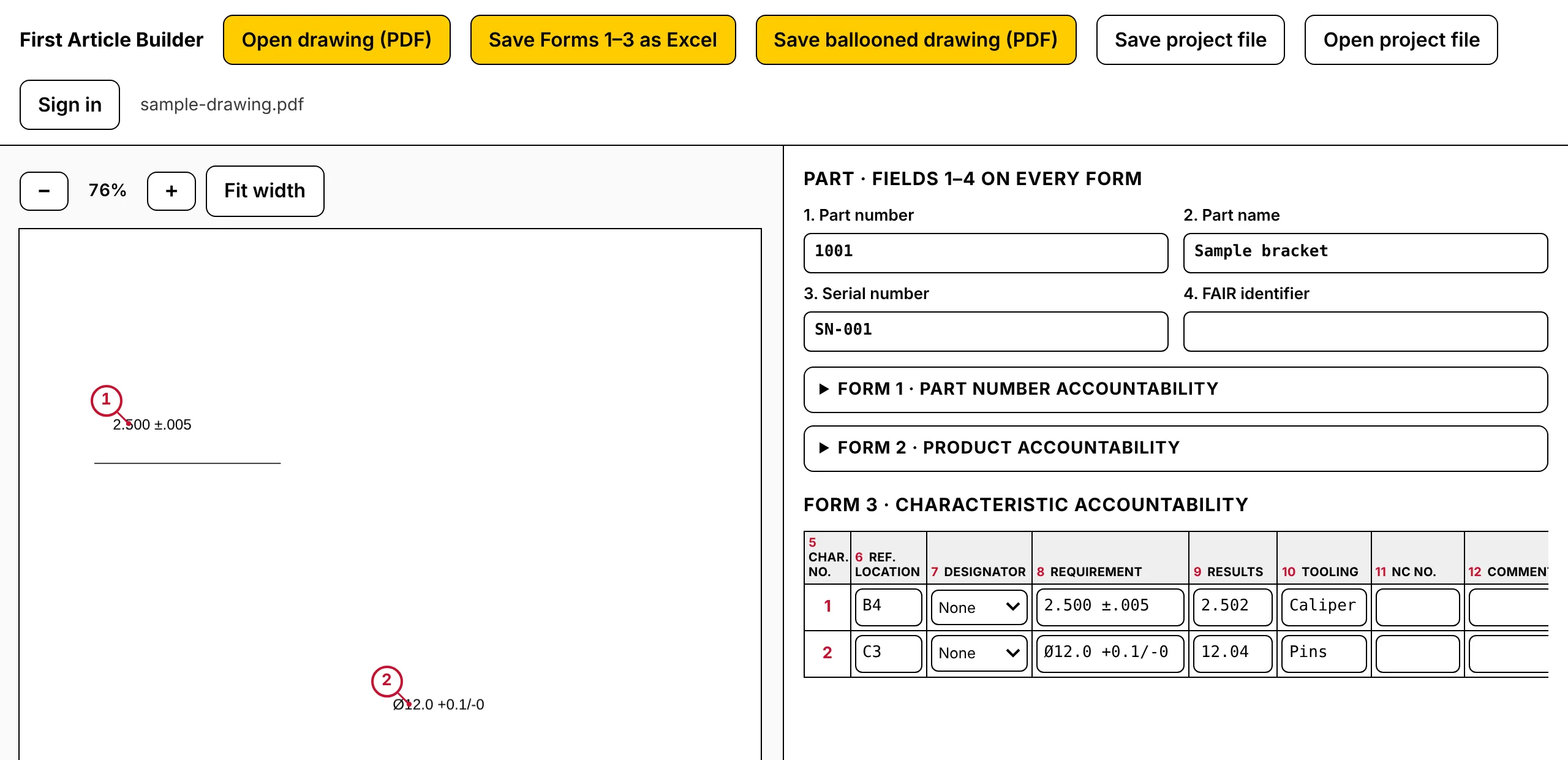
The app on the sample drawing, with two balloons placed and made-up measurement results. Click to enlarge.
What it will do
Three jobs, one shop price
1Balloon by clicking
Open the drawing PDF and click a dimension: it gets the next balloon number and its own Form 3 row. Renumber, move or delete balloons as the print changes. On PDFs with a text layer, the dimension text under your click is suggested; on scans you type it.
2Forms 1–3, AS9102 Rev C fields
Requirement, nominal, tolerance and limits per characteristic, pass or fail from the result you enter (plain dimensions use your title block's general tolerances, if you enter them; GD&T callouts such as position or flatness check the measured deviation against the stated tolerance). Type the results, or import them from your CMM software's CSV export: map the columns once and the app remembers them. Save Forms 1–3 as one Excel file and the ballooned drawing as a PDF.
3One flat price per shop
$49 a month or $490 a year for the whole shop: every inspector, every report, plus VAT or sales tax where applicable. No per-seat price, no user minimum, no annual contract required, no sales call.
How it works
How it stays on your computer
- 1No install, no upload. It is a web page: no installer, no admin rights, no licence key. The drawing PDF is opened from your disk and drawn on your screen in the browser. It is not uploaded to us or to anyone else.
- 2Reports are files you keep. Forms 1–3 save as an Excel file, the ballooned drawing as a PDF, and your work as a project file you can reopen. Keep them wherever your shop keeps quality records. The browser only holds a working copy.
- 3Our server will know your account, not your parts. Accounts are being built now. The server will store your email address and your subscription, nothing from your drawings or forms, and the app's content security policy will only let it reach our own sign-in and billing addresses, which carry no drawing content.
- 4Please never email us drawings. Support works from a description or a screenshot with the part details covered.
This is general information about how the software handles files, not export-compliance advice. Whether your process meets ITAR, EAR or customer requirements is for your own compliance person to decide.
Price
One plan, flat per shop
$49 / month
or $490 / year (two months free)
- Plus VAT or sales tax where applicable, shown at checkout
- Unlimited inspectors and reports
- 14-day free trial, no card needed; it ends by itself unless you subscribe
- Without a plan: free on 1 drawing with up to 10 balloons
- No per-seat pricing, no user minimum
- Your price never goes up while you stay subscribed; new prices apply to new sign-ups only
- Cancel yourself from the billing portal, no call or email needed
Where your money goes
| Hosting (Cloudflare Pages, free tier) | $0.00 |
| Payment fees (Stripe card fee and Stripe Billing, plus Stripe Managed Payments while it is on) | about $2.10–3.30; with Managed Payments about $3.80–5.00 |
| Email (Cloudflare Email Routing, Resend free tier) | $0.00 |
| Domain name (about $10 a year, once bought) | about $0.83 |
| The person who builds and supports it | the rest, about $43–46 |
Per $49 monthly payment, before any VAT. On the $490 yearly plan: about $18–30 payment fees (about $35–47 with Managed Payments), $10 domain, the rest about $433–462. Payment fees are from Stripe's Swiss price list (read 2026-11-18): 2.9% + CHF 0.30 for Swiss cards or 3.25% + CHF 0.30 for cards issued outside Switzerland, 2% more if a currency conversion is needed, plus 0.7% for Stripe Billing. Our Stripe account currently uses Stripe Managed Payments (Stripe handles sales tax and VAT as the seller, shown as "Sold through Link"), which adds 3.5% per payment on top; the lower figures apply if we turn it off before launch. Your drawings are processed on your own computer, so no server cost grows with use and nothing is metered. An estimate dated 2026-11-18, before launch, from Stripe's and Cloudflare's listed prices; it will be replaced with measured numbers and updated when they change.
For comparison: 1factory's Quality Control plan lists $75 per QC user a month with a 5-user minimum and a one-year commitment billed annually, so at least $4,500 a year (1factory pricing page, read 2026-11-18; check it for current prices). Here one plan covers the whole shop, month to month.
Questions
FAQ
Is ballooning manual or automatic?
Manual: you click each characteristic and the balloon is placed and numbered for you. There is no automatic ballooning of the whole drawing and no OCR, so there are no misread values to find and correct afterwards: you see each requirement as you click it. On PDFs with a text layer, the dimension text under your click is suggested so you don't retype it.
Where do the measured results come from?
You type them, or import your CMM software's CSV export: pick the column with the characteristic number and the column with the measured result once (the app remembers the mapping for the next file), check the preview, and the import fills the results column. Rows that match no balloon are listed, not dropped. It reads any CSV with a header row; there are no vendor-specific parsers. The file is read in your browser, not uploaded.
Which AS9102 revision?
AS9102 Rev C, Forms 1, 2 and 3. The app uses the standard's field numbers and names in its own layout; we are checking them against the published Rev C forms before sign-up opens. You still need your own copy of the standard.
When can I sign up?
When the app is built and tested. It is being built now and isn't open yet. There is no date and nothing to pay until then.
Does the trial need a card?
No. The 14-day trial starts without a card. If you don't add one before it ends, the trial simply ends and the app goes back to the free limit (1 drawing, up to 10 balloons); nothing is charged.
Is it ITAR or export-control compliant?
We can only tell you what the software does: the drawing is opened and processed in your browser and isn't uploaded. That is general information, not export-compliance advice. Whether a tool fits your ITAR, EAR or customer requirements is your compliance person's call.
We already keep Form 3 in Excel. Can we bring it over?
Yes. "Open Form 3 from Excel" in the app reads an .xlsx or .xls file in your browser (nothing is uploaded) and finds the Form 3 columns by their header names, such as Char. No., Requirement and Results, in Rev B or Rev C layouts. The rows come in without a place on the drawing; each next click on the drawing places the next one. Tested with our own export and template; other shops' templates work when their headers use the usual AS9102 field names.
My customer wants the FAIR in their supplier portal.
First Article Builder doesn't submit to customer portals. Form 3 saves to Excel with one row per characteristic, in AS9102 field order (5 to 12), so you can copy the cells from there and paste them wherever your customer's portal accepts pasted data. We haven't tested pasting into any particular portal.
What happens to my reports if I cancel?
They are files on your computer (Excel, PDF and the project file), so they stay yours. Nothing of them is stored on our side to delete or hold back.
Do I need to install anything? Which browsers?
Nothing to install and no admin rights needed: it is a web page. So far it is tested in Chromium-based browsers (Chrome, Edge). Safari and Firefox get tested before sign-up opens.
Are you connected to SAE or IAQG?
No. AS9102 is published by SAE International and the IAQG. First Article Builder is an independent tool and is not affiliated with or endorsed by either.